
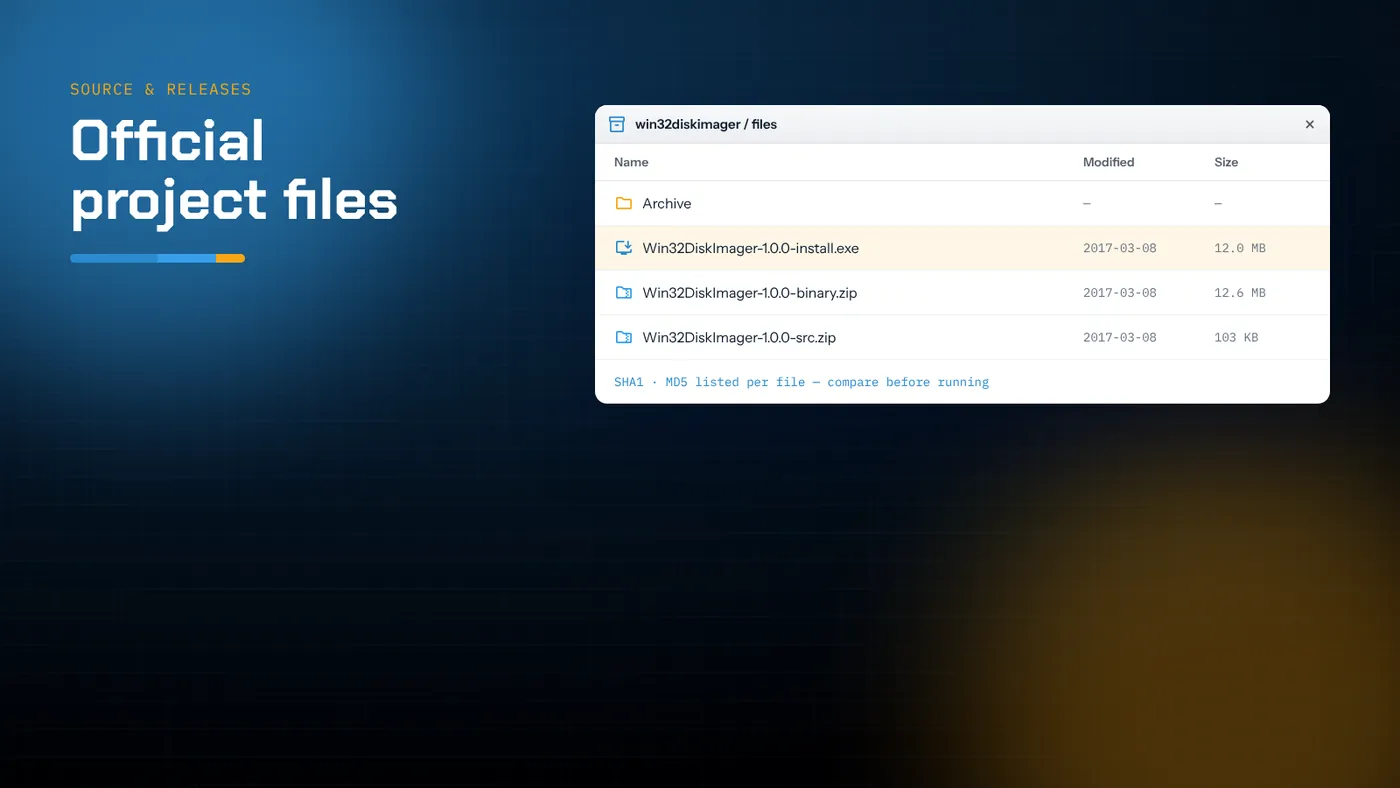
- The SourceForge project is the original home of the program; its latest release is 1.0.0, offered as an installer, a binary ZIP and a source ZIP.
- Download only from the project's own Files page and check the file against the checksums SourceForge shows.
- The 1.0 release added Verify Only, SHA-1/SHA-256 and Read Only Allocated Partitions.
- The GitHub native build is a separate Win32 rewrite with the same interface; neither replaces the other.
The project's original home
Win32 Disk Imager began as a small utility by Justin Davis for writing Ubuntu images to USB drives on Windows. It grew into a general raw-image tool and moved to a SourceForge project maintained by a group of contributors who call themselves the ImageWriter developers. That project is still the canonical source for the original Qt-based program, its release notes and its bug tracker.
When people search for "Win32 Disk Imager SourceForge", they usually want one of three things: the official download, confidence that the file is genuine, or the release history. This guide covers all three, and explains how the SourceForge release relates to the native GitHub build offered elsewhere on this site.
What the project page contains
The project page has the usual SourceForge sections. Four of them matter:
- Summary – a short description, the licence (GPL v2), screenshots and a green download button for the recommended file.
- Files – every published file, organised by folder. This is where you choose exactly what to download.
- Tickets – the bug tracker, where reports such as "Browse dialog doesn't open" or "Cannot read SD card" were logged and fixed.
- Code – the source repository history.
The big download button on the summary page picks a file for you based on your platform. It's usually the Windows installer. If you want something else, go to Files.
The 1.0.0 files
The latest release is 1.0.0, which its own notes call the "we made a 1.0 release" release. It comes in three forms:
| File | What it is | Choose it if… |
|---|---|---|
Win32DiskImager-1.0.0-install.exe |
Standard Windows installer | You want Start menu shortcuts and an uninstaller |
Win32DiskImager-1.0.0-binary.zip |
The same program, unpacked | You want a portable copy with nothing installed |
Win32DiskImager-1.0.0-src.zip |
Qt source code, about 100 KB | You want to read or build the code yourself |
Older releases, back to the 0.9 series, sit in an archive folder. There's rarely a reason to use them now. The one exception is diagnosing a machine where 1.0.0 crashes at startup, since an older build sometimes behaves differently. The guide on the program not opening covers that case.
What 1.0 changed
The 1.0 notes list several features that are now considered standard:
- Verify Image. It compares the image file with the device. It reads only as much of the device as the image covers, so a 2 GB image on an 8 GB card means 2 GB of reading.
- More checksums. SHA-1 and SHA-256 joined MD5.
- Read Only Allocated Partitions. Reading stops at the end of the last defined partition, so a 2 GB system on a 32 GB card produces a 2 GB image instead of a 32 GB one.
- Remembered folder. The last folder you used is stored and offered next time.
- Translations contributed by users.
The same notes list two known limitations that are still true: no reformatting, and no support for compressed images. They also state the build environment: Qt 5.7 with MinGW 5.3.
Downloading safely
The program is popular, so it is mirrored and repackaged on many download portals, some of which wrap it in their own installers with extra offers. The simplest way to avoid that is to download only from the project's own Files page.
Step by step
- Open the SourceForge project for win32diskimager.
- Click Files, then the folder for the current release.
- Click the file name you want. SourceForge shows a short countdown and then starts the download from one of its mirrors.
- If the download doesn't start, use the direct link offered on that page. Don't use links from ads around it.
Check the file
Next to each file in the Files listing is an information icon. It shows the file's size and its SHA1 and MD5 checksums. Compare those with your download:
PowerShell:
Get-FileHash .\Win32DiskImager-1.0.0-install.exe -Algorithm SHA1
Get-FileHash .\Win32DiskImager-1.0.0-install.exe -Algorithm MD5
If either value doesn't match, delete the file and download it again. A mismatch means it was corrupted in transit or isn't the file the project published.
There's a nice symmetry here: once the program is installed, its own Hash panel can do the same check on your OS images before you write them.
Installing the 1.0.0 release
The installer is a conventional wizard: licence, install folder, shortcuts, finish. A few notes:
- It installs into Program Files and asks for administrator rights.
- One of the bugs fixed in 1.0 was the installer not setting correct permissions. If you have an old 0.9.x install, uninstall it first.
- Windows may show a SmartScreen prompt. Read the file name before allowing it.
- After installing, start the program from the Start menu. It will ask for administrator rights itself, because raw disk access requires them.
If you prefer the binary ZIP, extract it to a folder such as C:\Tools\Win32DiskImager and keep every file together. The executable relies on the Qt and MinGW DLLs that sit beside it.
SourceForge vs the GitHub native build
You'll find the native GitHub build offered on this site's download section. The two are related but separate:
| SourceForge 1.0.0 | GitHub native build | |
|---|---|---|
| Toolkit | Qt 5 / MinGW | Native Win32 with WTL |
| Delivered as | Installer, binary ZIP, source ZIP | Source ZIP (build with Visual Studio) |
| Size | Several MB with runtime DLLs | Very small single executable |
| Oldest Windows | Windows 7 in practice | Windows XP |
| Device targeting | Volumes listed by drive letter | Whole USB device or a single partition |
| Interface | Image File, Device, Hash, Read/Write/Verify | Essentially the same |
Neither one replaces the other. If you want something installed in two minutes without compiling, use the SourceForge installer. If you want the smallest possible portable executable, need XP support, or want to target one partition, build the native edition.
Reading the ticket tracker
The Tickets section is worth a look before you assume a problem is your fault. Searching it for your error message often turns up a ticket with a workaround. Useful search terms include:
- "access denied"
- "device not ready"
- "crash on start"
- "not enough space"
Many tickets are years old, but the underlying Windows behaviour hasn't changed much, so the workarounds usually still apply.
Is the project still maintained?
Releases on SourceForge have been quiet since 1.0.0. That isn't necessarily a problem. The program does one narrow job, and the Windows APIs it relies on haven't changed. In practice it still runs on Windows 10 and 11.
What it does mean is that newer conveniences appear in forks rather than upstream. The native Win32 rewrite on GitHub is one example. If you need compressed image support or automatic verification, consider the tools in the alternatives guide.
Licence
Both the SourceForge release and the GitHub rewrite are licensed under the GNU General Public License version 2. You can use the program for any purpose, study and modify the source, and redistribute it, provided you pass on the same freedoms and include the source or an offer of it. The Qt build also includes Qt and MinGW runtime libraries under their own LGPL-style licences, which are shipped with the binary.
Building the 1.0 source yourself
The src.zip on the Files page is the complete Qt project, around 100 KB. Building it is a reasonable exercise if you want to study the code or add a small change, though most people are better served by the installer.
The release notes state the original build environment: Qt 5.7 with MinGW 5.3, using Qt Creator. A developer note in the archive covers details. Newer Qt 5 versions generally build it with minor adjustments. Expect to fix a deprecated call or two, and remember the program needs administrator rights at run time, so start Qt Creator elevated if you want to debug writes.
Keep your own build separate from the installed copy, and name the executable differently so you always know which one you're running. If you change behaviour that touches device access, test it on a spare card you don't mind losing.
Mirrors and repackaged copies
Download portals often carry Win32 Disk Imager with their own version numbers, descriptions and installers. Some of those wrappers bundle offers for unrelated software. Even when a third-party copy is genuine, you can't easily confirm it. The checksums on the SourceForge Files page apply only to the files the project itself published.
If you already downloaded a copy from somewhere else, compare its SHA1 with the value on the official Files page. If it doesn't match, or the portal gave you a different file name, uninstall it and get the official file instead.
Reporting a bug upstream
If you find a reproducible problem in the 1.0 release, the Tickets section is the right place for it. A useful report includes your Windows version and edition, the exact build you used, the card and reader models, the full error text and the steps that trigger it. Check open tickets first; adding detail to an existing report is more helpful than opening a duplicate. Problems with the native Win32 rewrite belong on its GitHub repository instead, because the two code bases are separate.
Summary
The SourceForge project is the official home of the original Win32 Disk Imager. Get 1.0.0 from its Files page, as an installer for a normal setup or as the binary ZIP for a portable one, and check the SHA1 or MD5 shown there before running it. Use the ticket tracker when you hit an error. If you want a smaller, XP-compatible executable, build the native GitHub edition as well. Both are free, both are GPL-2, and they work happily side by side on the same PC.